

Events
Three events exist in v1:
When a failure takes an automation away — revoked access to the account, a mailbox that refuses the sign-in, a channel that can’t be reconnected — the automation leaves the API and a last Automation status changed with the
error status is sent: by the time it arrives, looking the automation up by its ID answers automation_not_found. Deleting an automation or turning it off in the Agentova app sends nothing.
See Concepts for the lead sources and the runs produced by each channel.
Subscribing
POST /webhooks with a url and the events you want (at least one). The response includes a secret — shown once, at creation. Store it: it’s what you use to verify every delivery to this subscription. Each subscription has its own secret.
The url must:
- use HTTPS;
- point to a public address — local, private and cloud-metadata addresses are refused, and the host must resolve;
- carry no username or password.
400 invalid_request with details.parameter: "url" and a details.reason (https_required, private_address, local_address, credentials_in_url, unresolvable_host…).
A workspace can have 20 active subscriptions. GET /webhooks returns them all at once, without pagination — together with the disabled ones, until they’re deleted (see below). It returns the full url only for the subscriptions created with the key you call it with; for the others, url is reduced to its origin (for example https://hooks.zapier.com), since the path of a hook URL carries the connector’s secret token.
Subscriptions belong to the workspace: any key of the workspace lists them and can delete them. Revoking a key deletes the subscriptions created with it, unless the admin chooses to keep them — see Revoking a key. Workspace admins can see and delete every subscription in the Abonnements webhook table of Paramètres → API (Settings → API).
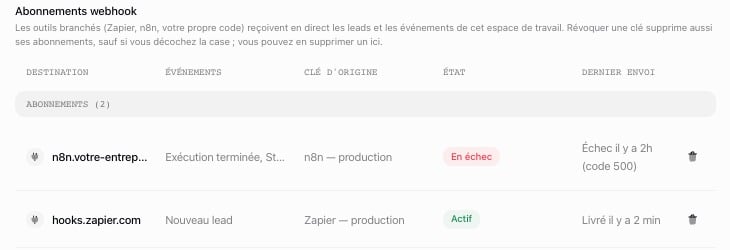
Abonnements webhook: one row per subscription, with the key that created it
The delivery
Every event is delivered as aPOST to your subscribed URL, with these headers:
The body is a JSON envelope:
data’s shape depends on type: a lead for lead.created, a run for run.completed, an automation for automation.status_changed — the same objects as GET /leads, GET /runs and GET /automations return.
- At least once. The same event can be delivered more than once, after a retry for example. Deduplicate on
id: it’s unique per event, identical on every attempt, and the same for every subscription that receives the event. Keep the IDs you’ve seen for at least 48 hours: retries are always scheduled within 36 hours of the event’s creation. - In no guaranteed order. Two events can arrive in any order — a pause and the reactivation that follows it, for example. To order them, use the resource’s own timestamp —
updated_atfor an automation,created_atfor a lead,occurred_atfor a run — not the order of arrival.
Verifying the signature
Every delivery carries anX-Agentova-Signature header:
t— when this delivery attempt was signed, as a Unix timestamp (seconds)v1— the HMAC-SHA256 of the string{t}.{raw body}, in lowercase hexadecimal
whsec_ prefix included. Some webhook libraries — those that follow the Standard Webhooks convention — strip a whsec_ prefix and decode what follows: don’t use them as is. With Agentova, the prefix is part of the key.
The signature is what authenticates a delivery. Don’t filter deliveries by IP address or by User-Agent: Agentova doesn’t publish a list of source addresses, and anyone can send that User-Agent.
To verify a delivery:
- Read the raw body, exactly as received, before any JSON parsing — a body parsed and serialized again doesn’t produce the same bytes.
- Reject it if
tis more than 5 minutes away from your current time. This stops replayed requests. - Compute the HMAC-SHA256 of
{t}.{raw body}with the full secret, and compare it tov1in constant time — never with==or===, which leak timing information.
The official connectors verify signatures for you: with the n8n node or the Zapier app, you don’t need this section. The Zapier app accepts signatures up to one hour old, because Zapier can process a notification with a delay and its notification address is already secret. For your own endpoint, keep 5 minutes.
Test vector
Check your implementation against these values before going live:Raw body
1790856000, your function must return true. It must return false when one character of the body changes, when the current time is more than 300 seconds away from t, and when the secret is used without its whsec_ prefix.
Reproduce the vector from a terminal
Reproduce the vector from a terminal
cc0aeaeeb19b6d50d7c200ece4653adfba91c3a9f6cb2223ca61cd3965bf55ee.Responding to a delivery
Agentova counts a delivery as successful when your endpoint answers with a 2xx status within 10 seconds — the whole exchange, not only the first byte. The body of your response is ignored. Anything else is a failed attempt: another status, a timeout, a connection error — and any 3xx too: redirects are never followed, so subscribe the final URL. Two answers have a special meaning:Retries
A failed delivery is retried, for 8 attempts in all over about 27 and a half hours:
Every attempt carries the same event
id, with a fresh signature (a new t). After the 8th failed attempt, the delivery is abandoned. A Retry-After can push an attempt later than this schedule, but no attempt is ever scheduled more than 36 hours after the event was created: when the next one would be, the delivery is abandoned.
When a subscription is disabled
When a delivery is abandoned, Agentova disables the subscription if both are true:- the subscription has at least 3 abandoned deliveries in a row;
- it has been failing without interruption for at least 72 hours.
disabled_at is set on it in GET /webhooks, and the workspace admins are notified in the Agentova app and by a push notification.
A disabled subscription can’t be reactivated: delete it and create a new one. With the official connectors, that means turning the Zap off and on again (Zapier), or deactivating and reactivating the workflow (n8n). A disabled subscription is deleted automatically 30 days after it was disabled.
While the API is switched off
Agentova can switch the API off temporarily: every call then gets503 service_unavailable. During such a break:
- no delivery is created for the events that happen in the meantime — they will never be sent;
- the deliveries that were already in progress are suspended, and resume when the API is back.
GET /leads, GET /runs and GET /automations.
Handling a delivery
- Verify the signature (above), on the raw body, before parsing it.
- Answer
2xxwithin 10 seconds, and do the heavy work afterwards — in a queue or a background job. - Deduplicate on
id: keep the IDs you already processed for at least 48 hours (retries are always scheduled within 36 hours of the event’s creation), and answer2xxto a duplicate without processing it again. - Don’t rely on the order of arrival: compare
updated_at(automation),created_at(lead) oroccurred_at(run).