

API keys
An API key —agk_live_ followed by 32 characters — gives access to the whole workspace: its automations, leads, runs and webhook subscriptions. There are no per-key permissions in v1, and no test keys: every key is live.
Agentova stores only a fingerprint of each key. A key is shown once, at creation, and can’t be displayed again: if it’s lost, create a new one.
Storing a key
- Keep it on a server: in a secret manager or an environment variable. Never in source code, a repository, a URL or a log.
- Never put it in a web page or a mobile app. The API doesn’t accept calls from browsers (no CORS), and anything shipped to a device can be read.
- Send it only in the
Authorization: Bearerheader, tohttps://core-api.agentova.ai/v1. - Create one key per tool or integration (“Zapier”, “n8n”, “CRM sync”…), so you can revoke one without breaking the others.
Rotating a key
A workspace can have up to 10 active keys, so a key can be replaced without interruption:- Create a new key in Paramètres → API (Settings → API).
- Put it everywhere the old key is used: reconnect the account in Zapier, update the credential in n8n, update your servers.
- Register your triggers again under the new key: turn each Zap off and on, and deactivate then activate each n8n workflow that uses an Agentova trigger.
- Revoke the old key, leaving ticked the box that deletes its webhook subscriptions — see below.
Revoking a key
A revoked key stops working immediately: every call made with it is refused with401 invalid_api_key.
When you click Révoquer (Revoke) on a key, the confirmation window Révoquer cette clé ? has a box ticked by default when webhook subscriptions were created with that key: Supprimer aussi les abonnements webhook créés avec cette clé (Also delete the webhook subscriptions created with this key); its wording gives their number and the servers they point to.
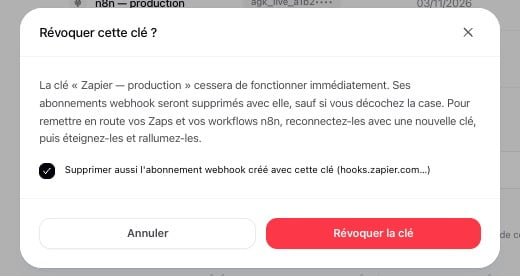
Revoking a key: the box is ticked by default
- Box ticked (the default): the subscriptions are deleted together with the key. A key that leaked may have subscribed someone else’s server: from then on, it receives nothing. The Zaps and n8n workflows that used those subscriptions stop receiving events; once they use a new key, turn the Zap off and on, or deactivate and reactivate the workflow, to register again.
- Box unticked: the subscriptions are kept and keep receiving your workspace’s events, as long as the admin who created the key remains an admin of the workspace. If they leave or lose that role, these subscriptions stop receiving events, with no alert, even though they still show in the Abonnements webhook table. To rotate a key for good, register your triggers again under the new key instead (see Rotating a key).
When an admin leaves
Only admins can create keys. When the admin who created a key leaves the workspace, is removed from it, deletes their account or stops being an admin, their active keys are revoked automatically, together with the webhook subscriptions created with them, and the remaining admins are notified. The subscriptions kept from a key they had already revoked (box unticked) stop receiving events too. If an integration stops with401 invalid_api_key after such a change, create a new key and reconnect it.
Webhooks
- Every delivery is signed with the subscription’s secret (
whsec_…, shown once, at creation). Verify the signature of every delivery, and reject deliveries signed more than 5 minutes ago — see Verifying the signature. - Authenticate deliveries with the signature. Not by IP address — Agentova doesn’t publish a list of source addresses — and not by their
User-Agent: Agentova-Webhooks/1.0header, which anyone can send: it’s only there to help you recognize deliveries in your logs. - Deliveries only go to public HTTPS addresses, and redirects are never followed. A subscription whose URL no longer passes these address checks — for example an IP address that has become forbidden — is disabled at once, without any delivery, and the workspace admins are notified.
- To change a subscription’s secret, create a new subscription, switch your endpoint to the new secret, then delete the old subscription. While both exist, the same event reaches both, with the same
id: deduplicate on it.
Calls from a browser
The API is server-to-server. It doesn’t send CORS headers, and a browser’s preflight (OPTIONS) request gets an error in the usual format. Call the API from your backend, and keep the key there.
Trying the API from this portal
The playground of the API Reference tab sends your requests through the proxy of Mintlify, the service that hosts this portal, since the API doesn’t accept calls from browsers. The key you paste there goes through that proxy. Prefer a key created for the occasion, in a test workspace, and revoke it afterwards.Data retention
Keys starting with
_ in a lead’s custom_fields are internal to Agentova and are never exposed by the API.