

List
Returns the automations of the workspace, one item per automation.
Each item contains:
id, name, type, provider, agent_id, agent_name, status, updated_at.
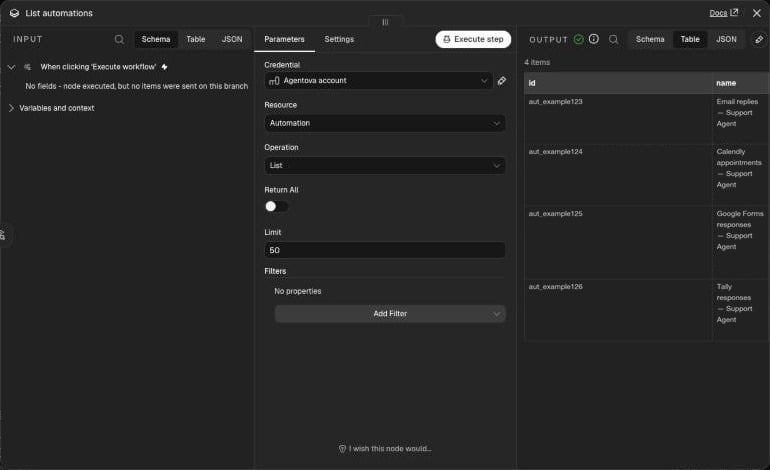
List run from a manual trigger: one row per automation
Not covered in v1: phone agents, the website chatbot itself (it’s an agent, not an automation), scheduled social posts, and builder workflows. An automation that was deleted or turned off in the Agentova app, or whose account is disconnected, doesn’t appear at all.
Get
Returns one automation. Choose it in the Automation field:- From List: a searchable list of your automations — type part of the name.
- ID: paste an ID (
aut_…), or map it from a previous node with an expression such as{{ $json.id }}.
Activate and Pause
Switch one automation toactive or paused. The Automation field works like in Get. The node returns the automation with its status after the change.
If Agentova can’t restart the automation — for example a CRM source whose connection can’t be restored — the automation ends up in error, and Activate fails with “Automation “…” could not be resumed, now in error” instead of reporting a success.
Pausing and reactivating are safe to repeat: pausing an automation that’s already paused, or activating one that’s already active, returns it unchanged — no error, and no new status event.
The API answers within 8 seconds. When reactivating takes longer — reconnecting a mailbox, for example — the response shows the status at that moment, and the final status arrives as an Automation status changed event: active, or error if the channel couldn’t be reconnected.
Nothing that arrives during a pause is caught up afterwards, except for Customer.io after a short pause:
Only
active and paused automations can be switched. A draft or error automation is refused (422 automation_not_controllable): fix it in the Agentova app first.
A mailbox can only be used by one active agent, as in the Agentova app: reactivating an email automation whose mailbox another active agent already uses is refused too (422 automation_not_controllable, with details.reason: account_in_use). Detach the mailbox from the other agent in the Agentova app first.
Use it as a tool for an AI agent
The Agentova node can be connected as a tool to n8n’s AI Agent node. The agent can then list your automations, look one up, and pause or reactivate it when you ask in plain language — for example “pause the comment replies”. It doesn’t schedule anything by itself: reactivate later by asking again, or with a scheduled workflow.Errors
The node picks its message from the errorcode returned by Agentova:
To keep a workflow running when one item fails, turn on the node’s On Error → Continue setting.