

Choose the events
In Events, tick one or more: Lead Created, Run Completed, Automation Status Changed.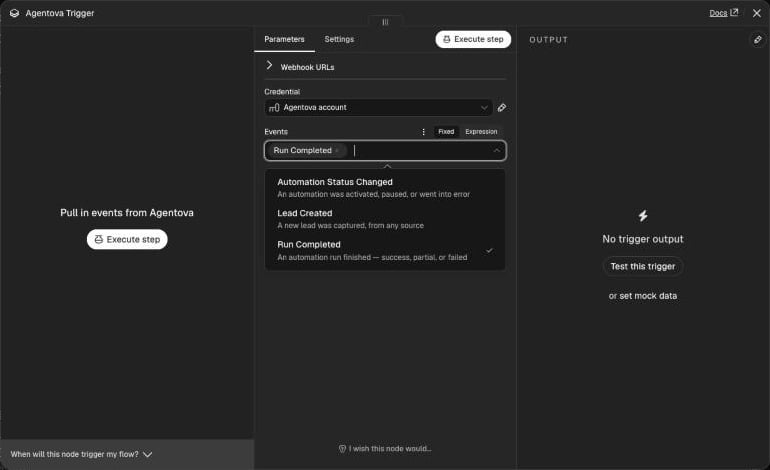
The three events offered by the trigger
When a failure takes an automation away — revoked access to the account, a mailbox that refuses the sign-in, a channel that can’t be reconnected — the automation leaves the API and a last Automation status changed with the
error status is sent: by the time it arrives, looking the automation up by its ID answers automation_not_found. Deleting an automation or turning it off in the Agentova app sends nothing.
The trigger fires for the whole workspace. To keep only some items (one source, one agent, only failures…), add an If or Filter node right after it — see Example workflows.
What each event contains
Every execution receives one item with the envelope of the event:Lead created
A lead is created — and Lead created fires — from five places:
A
social or crm lead is created only when the prospect gave an email or a phone number, and only once per person and automation. Its name is what Agentova knows: the Instagram or Facebook username for social, the first and last name from the CRM for crm.
These don’t create leads: the private messages and emails your agents reply to, and comments that don’t lead to contact details. For CRM sources other than Customer.io, the partner service that relays their events doesn’t yet tell Agentova which automation handled a contact: their leads are recorded only when the workspace has a single such CRM automation.
phone is the number as it was typed or captured — it isn’t normalized. custom_fields holds the extra answers of the form; keys starting with _ are internal to Agentova and are never exposed.
data contains: id, source, agent_id, name, email, phone, custom_fields, created_at.
Run completed
Good to know:
- No run when nothing happened. A message your agent finally didn’t answer produces no run.
- Several messages in a row, one run. Messages that arrive together and are answered together make a single run.
- A Lead Ads automation with no action configured still records a run, with the
successstatus and an empty list of actions. While it’s paused, its leads are created but no action runs. - No runs for the website chatbot.
- CRM sources: Customer.io records a run for each contact it acts on. The other CRM sources (HubSpot, Typeform, Close, Monday, ClickUp, Tally, Odoo…) are relayed by a partner service that doesn’t yet tell Agentova which automation handled an event: their runs are recorded only when the workspace has a single such CRM automation. A CRM workflow records one run per action.
- On comments, an action you didn’t configure can show as
success. This is a known limitation. - Runs are kept for 90 days, then deleted.
data contains: id, automation_id, status, trigger_type, occurred_at, actions (each with its own type, and a status that is success or failed — only the run as a whole can be partial), lead_id.
Automation status changed
data is the automation: id, name, type, provider, agent_id, agent_name, status, updated_at. Pausing an automation that’s already paused changes nothing, so nothing fires; deleting an automation or turning it off in the Agentova app doesn’t fire either.
Activate the workflow
Activating the workflow registers the trigger with Agentova (a webhook subscription); deactivating it deletes that subscription. You never manage it by hand. At each activation, the trigger also repairs its registration: if Agentova disabled the subscription after repeated failed deliveries, if n8n’s webhook address changed, or if you changed the selected events, the old subscription is deleted and a new one is created. Leftovers of a failed activation are cleaned up the same way. To try it before activating, click Listen for test event (or Execute step), then make the event happen in Agentova — for example pause and reactivate an automation.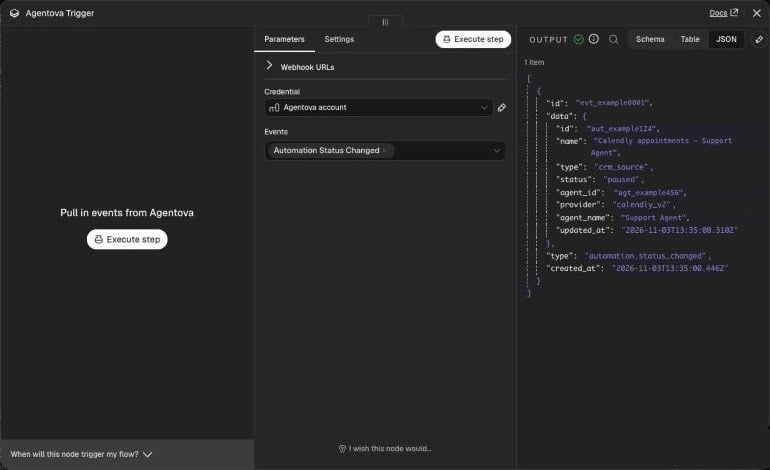
A real event received: an automation paused in the workspace
Security, duplicates and order
- Signature check. Every notification from Agentova is signed. The trigger checks the signature and its age (5 minutes at most) before starting the workflow. Anything unsigned, forged or replayed is refused, never reaches your workflow, and n8n logs a warning with the reason — never the secret.
- Duplicates. After a network problem, Agentova can send the same event again. The trigger remembers the events it has already processed for 72 hours (up to 50,000 events) and starts the workflow only once per event — within the same n8n process: this memory is lost when n8n restarts, and isn’t shared between instances in queue mode.
- Order. Events can arrive in any order. To know the latest status of an automation, compare
{{ $json.data.updated_at }}, not the order of the executions.
After an outage
If your n8n was unreachable for a long time, Agentova makes up to 8 delivery attempts for each notification over about 27 and a half hours. Once three notifications in a row have been abandoned and deliveries have been failing for at least 72 hours, Agentova disables the subscription and notifies your workspace admins. Deactivate, then activate the workflow: the trigger deletes the disabled subscription and creates a new one. The same applies if the subscription was disabled at once because its URL no longer passes Agentova’s address checks. Agentova can also switch its API off for a while. The events that happen during such a break are never delivered: once the API answers again, catch up with the API’s list endpoints (GET /leads, GET /runs, or Agentova → List for automations).